Learnings from Deploying the Landing Zone Accelerator on AWS
A look at the Landing Zone Accelerator on AWS (LZA) and our experience using it.


At Steamhaus we’ve been using LZA for a couple of years now to build well-architected multi-account, multi-region AWS environments for multiple clients in as little as a day. It has proved to be a very valuable tool, though there are some things to watch out for when using it.
This won’t be an exhaustive runbook on how to deploy LZA (AWS have already covered that here), but rather a quick rundown of how it works and our findings from using it.
What is it?
LZA is an open source project maintained by AWS Labs. It is used to create and maintain AWS Organisations that align with AWS’ best practices. It can manage AWS accounts, networking, security, logging and more.
Under the hood, it uses the AWS Cloud Development Kit (CDK) to synthesise CloudFormation stacks that orchestrate the environment. When using it however we don’t need to concern ourselves with that - all we need to provide is a set of declarative configuration files that define the desired environment.
The LZA project can be found here.
How do you use it?
Getting started is quite straightforward, all you need is an AWS account! From the AWS account, all we need to do is:
- Commit a set of configuration files to the VCS provider of your choice, as long as it’s supported by AWS CodeConnections.
- Set up some prerequisites such as a connection to the repository where your configuration is held and a GitHub access token to allow pulling the public LZA repository.
- Configure and deploy an installer CloudFormation stack from a template provided by AWS.
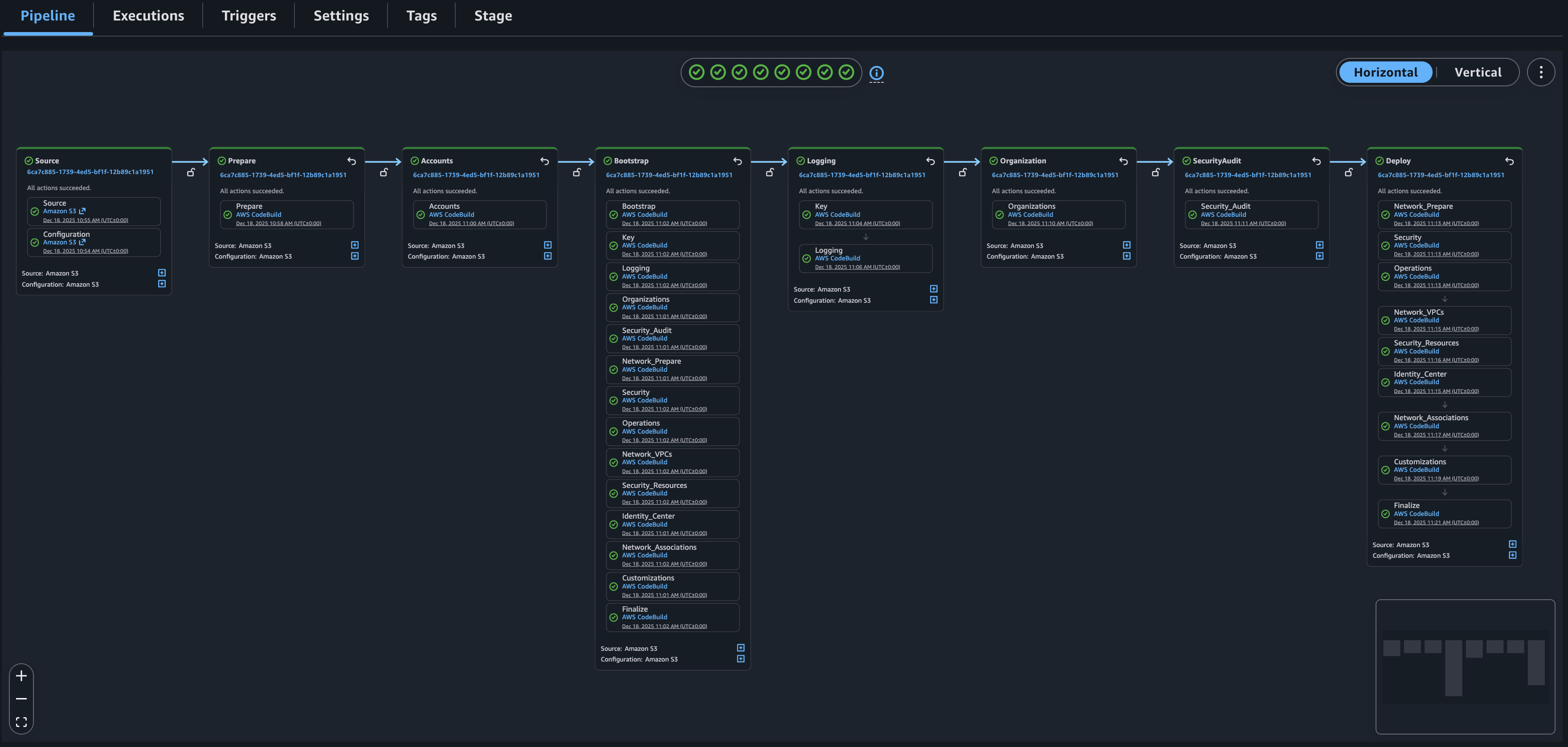
From there, the CloudFormation stack will begin creating resources that ultimately set up a pipeline in AWS CodePipeline - this is where our organisation is created and configured.
Validation takes place at the beginning of the pipeline to prevent misconfiguration and each action handles a part of the environment, creating the respective resources.
When we keep the configuration in a version control system, commits to the repository will automatically trigger a new pipeline execution and apply the necessary changes to make the environment match the desired state.
There are six core configuration files we need to provide:
global-config.yaml: Defines the home region, enabled regions, logging, and Control Tower settings.accounts-config.yaml: Specifies accounts.organization-config.yaml: Configures AWS Organisations to define organisational units, service control policies, tagging policies and others.network-config.yaml: VPC architecture, subnets, and connectivity.security-config.yaml: Security tooling, Config rules, and compliance controls.iam-config.yaml: IAM roles, policies, and Identity Center configuration.
For more advanced usage, we can provide some optional files such as customizations-cofig.yaml to create any resources that LZA itself doesn’t support, and replacements-config.yaml for reusable values.
There’s quite a bit to configure here, from accounts to networking to various policies and more, which can all be a bit overwhelming. However, AWS provide a universal configuration that works as a great baseline to start with. In addition, TypeDocs documenting all configuration options are available to reference.
Our experience with using it
It really does a lot
The main benefit of LZA is that it distils a complex environment into a set of a few configuration files. Without having to architect or implement anything, you get an organisation managed by Control Tower along with guardrail SCPs, a comprehensive centralised logging solution, a set of security tooling to monitor & improve your security posture and much more, all following AWS’ prescriptive guidance.
While not necessary, we strongly recommend taking a look at the documentation on the solution’s architecture provided by AWS.
Best practices can be off the beaten path
While following AWS’ guide for getting started with LZA is easy, making sure you follow all the best practices requires straying slightly off the paved road. For example, to deploy the LZA pipeline to a dedicated AWS account and remove the need to access to the management account when checking on the pipeline you’d need to clone the official repository and build your own CloudFormation stack template manually.
AWS do provide documentation on such options, but you have to be a bit vigilant to spot and implement them to make sure your environment is leveraging everything LZA can offer.
Bring popcorn
The LZA pipeline is composed of a large number of smaller jobs, each with their own responsibility. Unlike something like Terraform that would look at the configuration we want and compare it to the existing environment to only apply differences, LZA will run every job regardless of what the changes are, which can take a while. Execution time will massively vary depending on the changes made and the size of the organisation but currently it is a minimum of 20-25 minutes.
That being said, it has gone a long way since we started using it; earlier versions would take over 50 minutes even when no changes were made. New releases often include optimisations to drive the execution time down and we expect this to improve even more in the future.
Tips for getting started
Start simple, stupid
Start simple and build out incrementally. LZA provides configuration for many services and it’s tempting to start out with an environment that has all the bells and whistles but it’s important to keep in mind that it also does a lot of abstraction so it’s easy for something to get misconfigured. It’s much easier to figure out what’s wrong when changes are small so we suggest to start with a simple, minimal environment and make additions to it once you have a working baseline.
Keep your configuration well-organised
As mentioned in the last section, LZA covers A LOT of services and trying to configure them all is fun and all but unless you like walls of YAML it’s important to take it slow and make sure your configuration files are easy to follow. There are some features that help with this:
- Use VPC Templates to significantly cut down on boilerplate in the network configuration (but be aware of costs if using IPAM!).
- Extract repeatable sections using the
!includedirective to make updating your configuration much easier and less prone to human error.
Check twice, deploy once
This might sound obvious but a lot of resources are harder to roll back than they are to deploy, so take your time to go over the configuration options in detail before deploying. We normally spend much more time on making sure that the configuration is as we intend than actually deploying it.
Closing thoughts
All things considered, we've had a great experience with using LZA and are planning on continuing to use it going forward. There are some improvements we would like to see, such as the ability to validate configuration before committing it to get quicker feedback and the upgrade process being more streamlined.
When keeping its limitations in mind, it’s a big reduction in burden and a massive speedup over creating and maintaining a bespoke solution. With it being under active development there are constant improvements contributed to it and we expect it to only improve over time.

.jpg)



-min.jpg)




.webp)
.webp)











.webp)